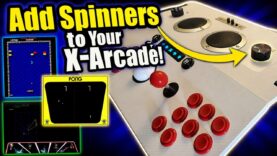
Have It ALL! Haptics AND Spinners in your X-Arcade Arcade2TV-XR!
Shop X-Arcade: genxgrownup.com/xgaming
The X-Arcade can do it all. Almost. That is until you install the spinner kit to expand the types of games this will support!
The X-Arcade can do it all. Almost. That is until you install the spinner kit to expand the types of games this amazing piece of tech can support!
This video takes you through the install of the spinner kit for the X-Arcade with the Haptics Kit already installed.
#arcadegames #arcade #retrogaming #genxgrownup ?#xgaming @Xgamingx-arcade
– SHOP
X-Arcade » genxgrownup.com/xgaming
genxgrownup.com/amazon
GenXGrownUp.com/merch
– PODCAST
GenXGrownUp.com/pod
– SUPPORT US
patreon.com/genxgrownup
– WEB & SOCIAL
GenXGrownUp.com/discord
twitch.tv/genxgrownup
fb.me/GenXGrownUp
bsky.app/profile/genxgrownup.com
www.tiktok.com/@genxgrownup
www.instagram.com/genxgrownup/
GenXGrownUp.com
– SPONSORS
Order of Cosmic Champions » www.orderofcosmicchampions.com
– CHAPTERS
00:00 – Intro
01:06 – Parts list
01:24 – Figuring out the why’s
02:13 Summary of steps
02:55 Tool you need
03:10 Opening the back panel
06:10 Installing spinner controls
09:29 Removing front panel
10:14 Adjusting the game plan
10:56 Removing haptic controller
12:06 Disconnecting track ball
12:34 Connecting cable to the main board
14:06 Adding new board
14:44 Wiring the new board
16:21 Putting it all back together
17:29 Tempest
17:48 Arkanoid
18:21 Pong
18:44 My thoughts
19:43 Spinner Test
21:06 End comments